
There's a version of this conversation that stays theoretical – data quality matters, governance is important, AI needs the right context. Everyone agrees.
AI Case Studies with Megaladata

This report examines how Megaladata uses artificial intelligence to solve diverse problems. It details the specifics of working with large language models (LLMs) in Megaladata, including:
Structuring and classifying reference information
Automatic documentation
Code generation
Automating data processing
Structuring and classifying reference information
Automatic documentation
Code generation
Automating data processing
Defining AI and large language models
Artificial intelligence (AI) remains one of the most discussed topics in information technology. Its growing popularity has led to the term "AI" being applied broadly—from microwave ovens to databases. Before exploring use cases and approaches for implementing AI-based systems, we must define key terminology.
Large language models
We define AI as large-scale language models (LLMs). These models possess unique emergent properties that distinguish them from other neural networks. LLMs do more than solve the token-generation tasks they were trained on; they apply knowledge and skills to address complex problems.
Key Properties of LLMs
LLM-based systems stand out because a significant portion of their logic relies on prompting—plain text in human language. Key properties include:
- Problem statements framed as requests to the LLM.
- Versatility.
- Contextual learning.
- Stochastic generation (multiple answers to the same query).
- Scale.
- High computational cost.
Among these, versatility and stochasticity are particularly notable. LLMs excel in tasks like text or image generation but often fall short in specialised applications, where dedicated tools perform better. This distinction is crucial when building AI systems.
Working with AI in Megaladata
REST request component
Megaladata implements AI using the REST Request component. Note: The server handling LLM requests is always external. Many options exist, such as:
llama.cppOllamavLLMGPU Stack
Installing and configuring these is straightforward if you have a powerful GPU server.
Creating connectors
To work with external services via REST API, we recommend:
- Creating a separate Megaladata workflow (a "connector").
- Linking it to your main "production" workflow.
Developing these connectors is simple, but you must study the external service’s documentation to understand request formats and response structures.
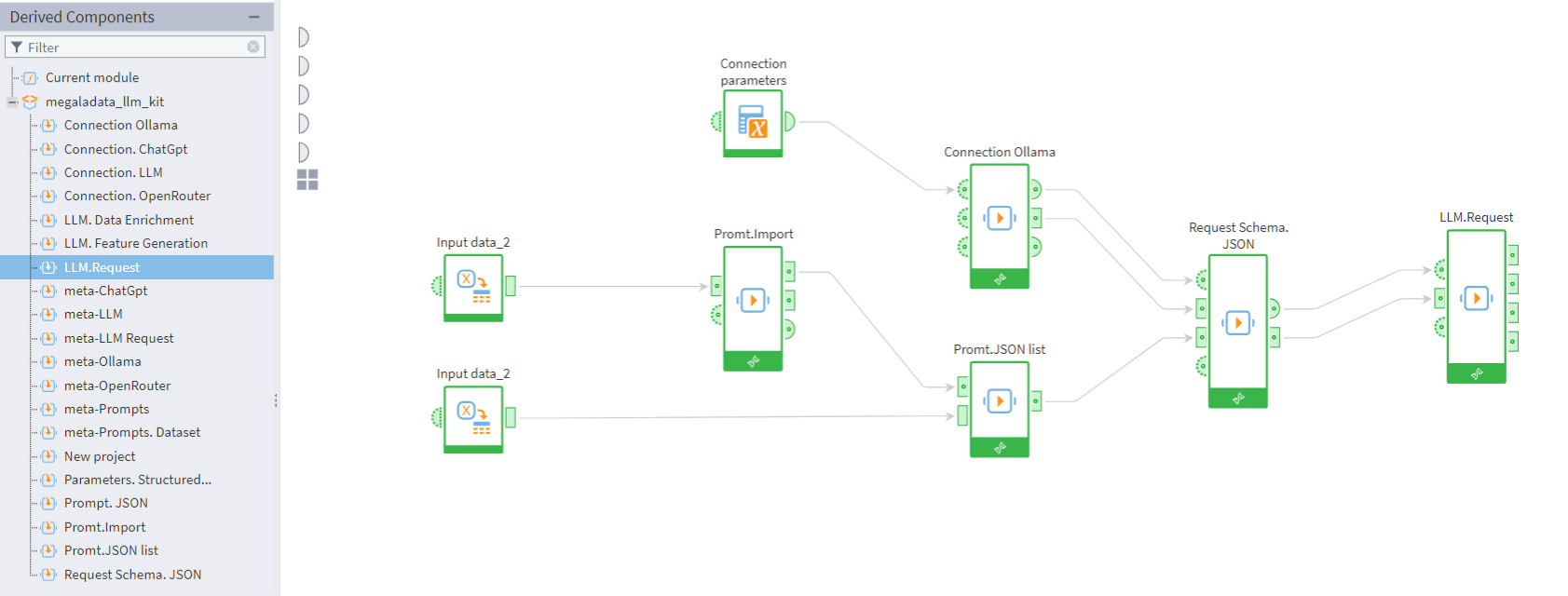
Megaladata LLM Kit is a library for working with LLM services
Megaladata LLM kit
Megaladata LLM Kit is a ready-to-use library for working with LLM services. It includes:
- Parameter storage options.
- Prompt templating.
- Pre-built connectors for GigaChat, Ollama, and OpenRouter.
- Solutions for data enrichment and feature generation.
This library eliminates the need to create custom connectors. It is thoroughly documented and freely available.
Corporate vs. individual use
Corporate use differs significantly from individual use. While Megaladata supports both, corporate systems are more complex due to requirements for:
- Security
- Fault tolerance
- Scalability
- Logging
- Result storage
With thousands of daily users, unforeseen issues inevitably arise. Minimising these risks and addressing root causes is essential.
Can AI replace corporate or individual systems?
Despite the hype, headlines like "How I Built a Corporate System Alone" or "How AI Replaced Half Our Developers" are unrealistic. Corporate systems embody the unique expertise of many specialists. Even advanced AI cannot instantly grasp the nuances of business processes or deliver precise results.
For now, we must continue building systems and data processing workflows, using AI only where it is most effective.
Case studies
1. Structuring reference data
Structuring reference data (RD) is a common text processing task. Descriptions of inventory items or other objects are often unstructured. To enable tasks like deduplication, parameter-based search, and similarity matching, we must structure the data: assign a class to each record and define attribute values.
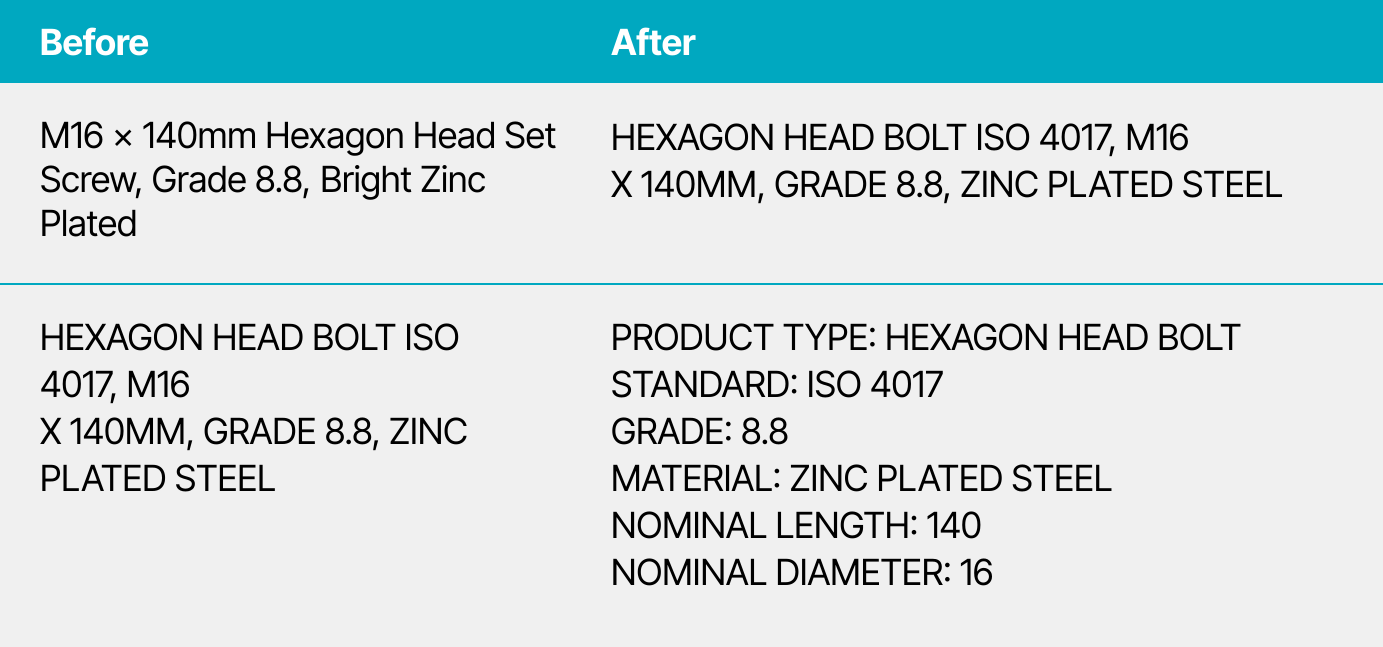
Structuring of master data
AI solutions:
- Data enrichment: If descriptions lack sufficient data, AI can search online and generate summaries.
- Classification: Instead of training custom ML models, you can prompt an LLM to classify records into predefined classes.
- Attribute determination: Use the few-shot approach, providing examples in prompts to guide the LLM.
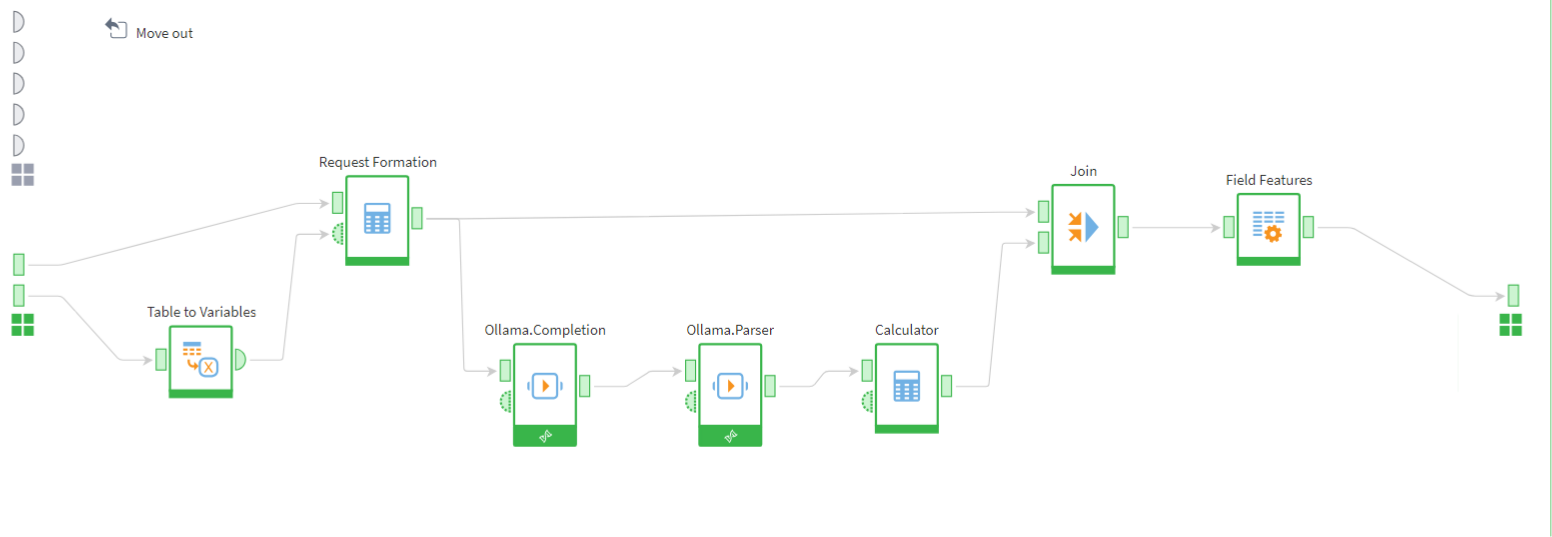
RD classification
Challenges:
- Limited class capacity in large classifiers.
- Need for precise instructions and response format control.
- High computational costs and slow processing.
Despite these, fine-tuning prompts and using high-quality classifiers can achieve excellent results.
2. PDF recognition
Extracting information from PDF reports is another use case. The goal is to identify objects (e.g., real estate properties) and their characteristics. While Megaladata lacks native PDF support, AI can help.
Process:
- Read and download PDFs (requires minimal coding).
- Convert pages to BASE64-encoded images.
- Prompt a multimodal LLM (e.g.,
gemma3orqwen3VL) to extract data.
OpenRouter.ai is a useful aggregator for LLM services. Processing involves looping through files and pages, sending requests, and handling responses. AI outperformed classic OCR, delivering higher-quality results with less manual cleaning.
3. Auto-documentation
Developers often dislike writing documentation, but it’s essential. In Megaladata, we created a dedicated workflow to parse and document other workflows.
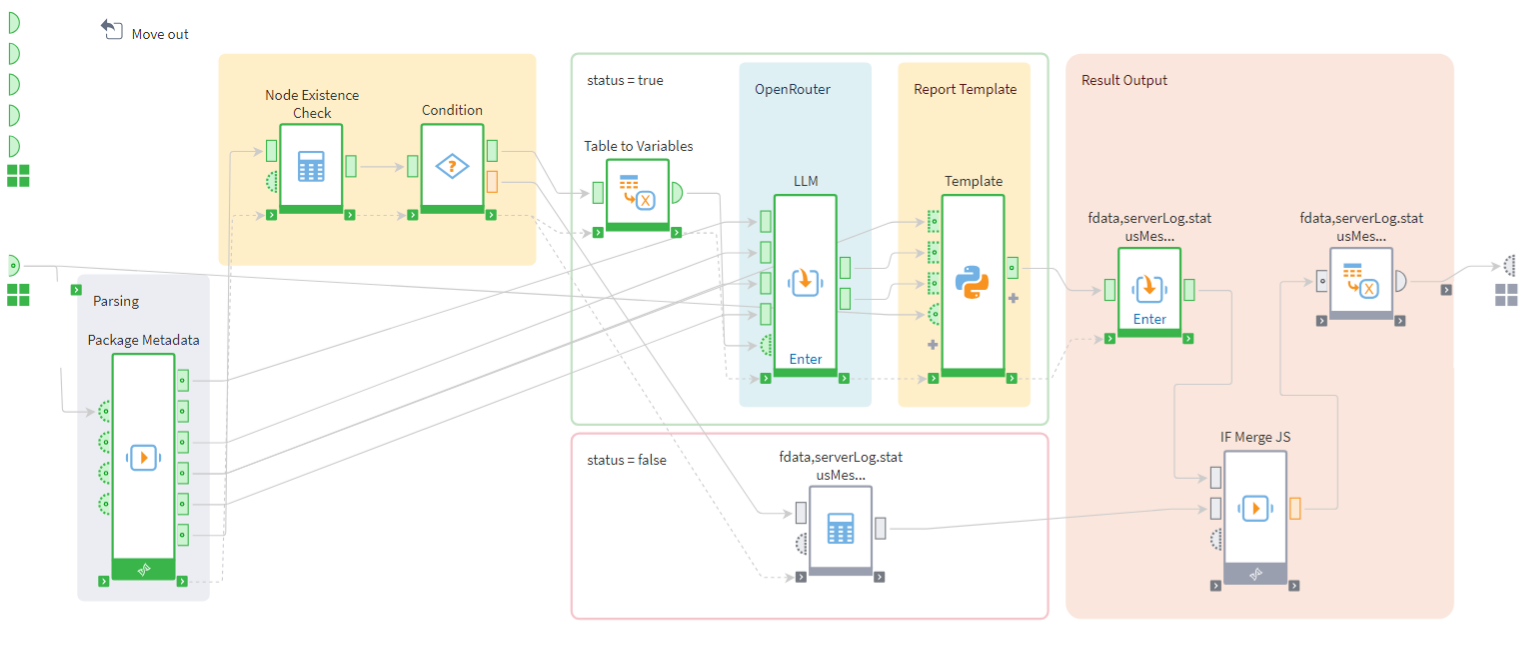
Auto-documentation workflow in Megaladata
The autodocumentation workflow file is a zip archive. It contains XML files describing the used components and set parameters for each Megaladata module.
Process:
- You send the file to document as the workflow input.
- The workflow parses the XML files, creating an LLM-friendly structure.
- The system sends queries to the LLM to do the following:
- Determine the script’s nesting level.
- Describe the workflow.
- Create a summary for the package.
- Megaladata's workflow compiles LLM responses into a document template and outputs the description for your initial pipeline.
While not perfect, this approach shows promise, especially as LLMs improve.
4. Code generation for JS and Python
It’s no secret that LLMs already generate code effectively. Of course, in complex scenarios such as integrating code into large projects they often produce inaccurate results. Many developers remain sceptical of AI’s coding abilities, and for good reason.
However, LLMs excel at creating small, task-specific code blocks for data processing exactly what Megaladata users need.
Most data analysis tasks in Megaladata can be handled using built-in features, without programming. But sometimes, you may want to use a model from Python’s extensive library, generate a dataset, or perform advanced text processing tasks where JavaScript would be highly useful.
You could use ChatGPT for this, but there’s a catch the generated code must run in Megaladata’s specific environment, so you can’t just copy-paste it from a browser and expect it to work.
To ensure the AI generates Megaladata-compatible code, you need to provide it with the relevant section of Megaladata’s documentation. This can be done by sharing links to Megaladata or by preparing a system prompt based on the documentation something Megaladata’s specialists have recently done.
Simply upload this file to your chat, describe your task, and request code tailored for Megaladata. Then, copy and execute it.
This approach truly simplifies using JS and Python in Megaladata, making it accessible even to non-programmers.
Key takeaways
- Start using Megaladata’s AI capabilities for suitable tasks.
- Avoid replacing entire workflows with LLM calls for now.
- Focus on AI’s strengths and limitations to maximise benefits.
Megaladata continues to integrate AI experience into its platform and client projects.
More on AI in Megaladata:
See also

How to Build a Data Workflow That AI Can Actually Trust

How To Use Execution Order Ports When Running Megaladata Workflows
Megaladata automatically optimizes workflow execution: It runs only the nodes linked by a data chain and uses parallel computing. However, in some cases, you may need to set the execution order manually. You...
1 TB in Under 13 Minutes: Performance Test Report
For this test, we ran Megaladata 7.3.3, importing 1 TB from two production DBMSs simultaneously, with transformations applied, over a standard cloud network. Five consecutive runs. Average: 12 minutes...
About Megaladata
Megaladata is a low code platform for advanced analytics
A solution for a wide range of business problems that require processing large volumes of data, implementing complex logic, and applying machine learning methods.
GET STARTED!
It's free