
There's a version of this conversation that stays theoretical – data quality matters, governance is important, AI needs the right context. Everyone agrees.
Connecting to ChatGPT on the Megaladata Platform

Automate requests to large language models using Megaladata. This article explores how to connect to ChatGPT via an API connector on the Megaladata platform. With this connector, you can automate text cleaning, meaning extraction, classification, and other tasks related to LLMs.
Artificial Intelligence (AI) is increasingly being integrated into business analytics and data processing. For some tasks, AI is not just a trend but a practical tool. It helps automate routine operations and improve the accuracy of analytical solutions. In this context, AI primarily refers to Large Language Models (LLMs).
In practice, businesses often need more than just "chatting" with a model. They require integration into existing processes, such as implementing intelligent search, automatic text classification and enrichment, comment analysis, or document processing. Automation is key. Requests to the language model should be generated by the system, executed programmatically, and return results directly to the analytical workflow, without manual copying and ideally without user intervention.
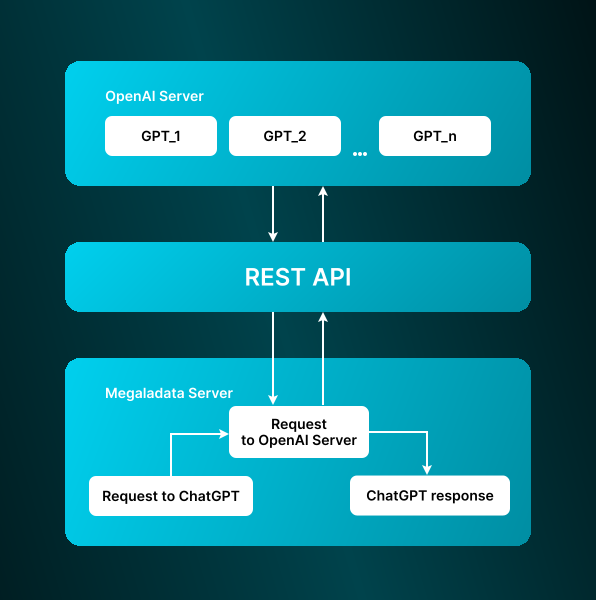
Megaladata and ChatGPT interaction
Megaladata workflow description
The file chatgpt_api.mgp contains a ready-to-use connector for the ChatGPT API, complete with example requests.
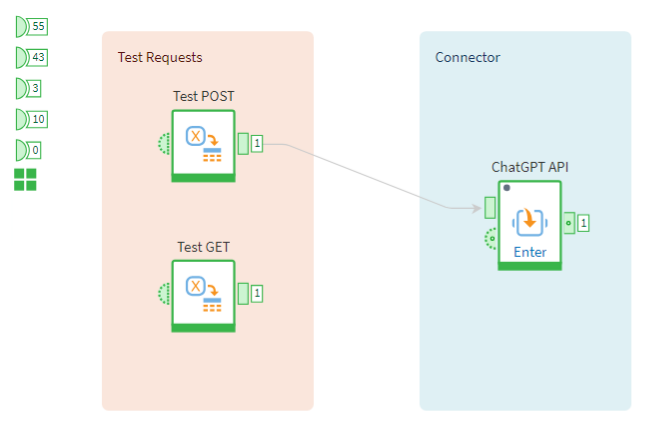
Workflow appearance
Important notes:
- When working with external services and APIs, consider infrastructure and network restrictions. Direct API access may be unavailable due to network environment or access policy limitations. IT specialists typically resolve this using standard tools for secure and stable connections.
- ChatGPT API access is not free. You need a registered account and a paid subscription. The available processing models (LLM versions) depend on your subscription.
- Evaluate the token volume of LLM responses. Larger responses may increase the cost of interacting with OpenAI’s servers.
Request structure
Requests in JSON format are submitted to the input port "Table" and follow this structure:
{"model": "gpt-4", "input": "What is low code?"}
In this example, the prompt for the language model is "What is low code?". This is the minimal parameter set required for the Workflow to function. For a full list of request parameters, refer to the official ChatGPT API documentation.
The input port for variables contains parameters to configure the connector.
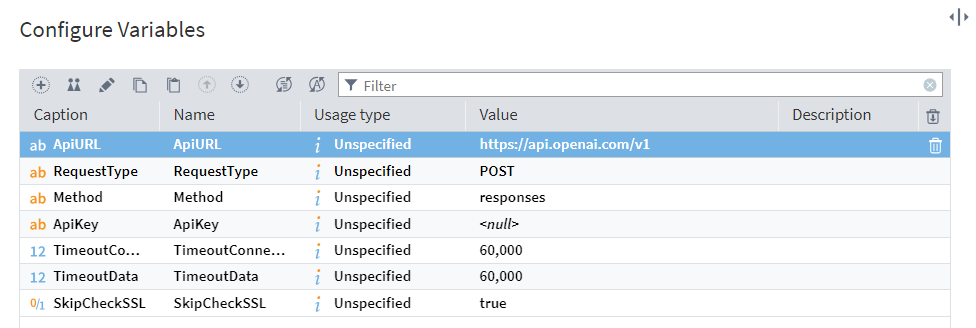
Variable configuration
The table below shows the query parameter settings.
| Parameter | Description |
|---|---|
| ApiURL | OpenAI API root URL (default: https://api.openai.com/). |
| RequestType | HTTP request type: POST or GET. |
| Method | API method (e.g., responses). For a full list, refer to the OpenAI documentation. |
| ApiKey | Your OpenAI API key. You can set it here or use the OPENAI_API_KEY environment variable. If NULL, the system retrieves it from OPENAI_API_KEY (Control Panel → System → Advanced system settings → Environment variables). |
| TimeoutConnection | Connection timeout (ms): the maximum time to establish a TCP connection to the server. If zero, the timeout is unlimited. |
| TimeoutData | Data exchange timeout (ms): the maximum time to send an HTTP request and receive a response. If zero, the timeout is unlimited. |
| SkipCheckSSL | Ignores SSL certificate errors if set to true. Errors during server certificate verification are overlooked. |
Output configuration
The output table includes:
- Response: Server response in JSON format.
- HttpStatusCode: HTTP response code.
- ErrorDesc: Error description (if any).
- Request: The submitted request.

Output column configuration
The server responds in JSON format.
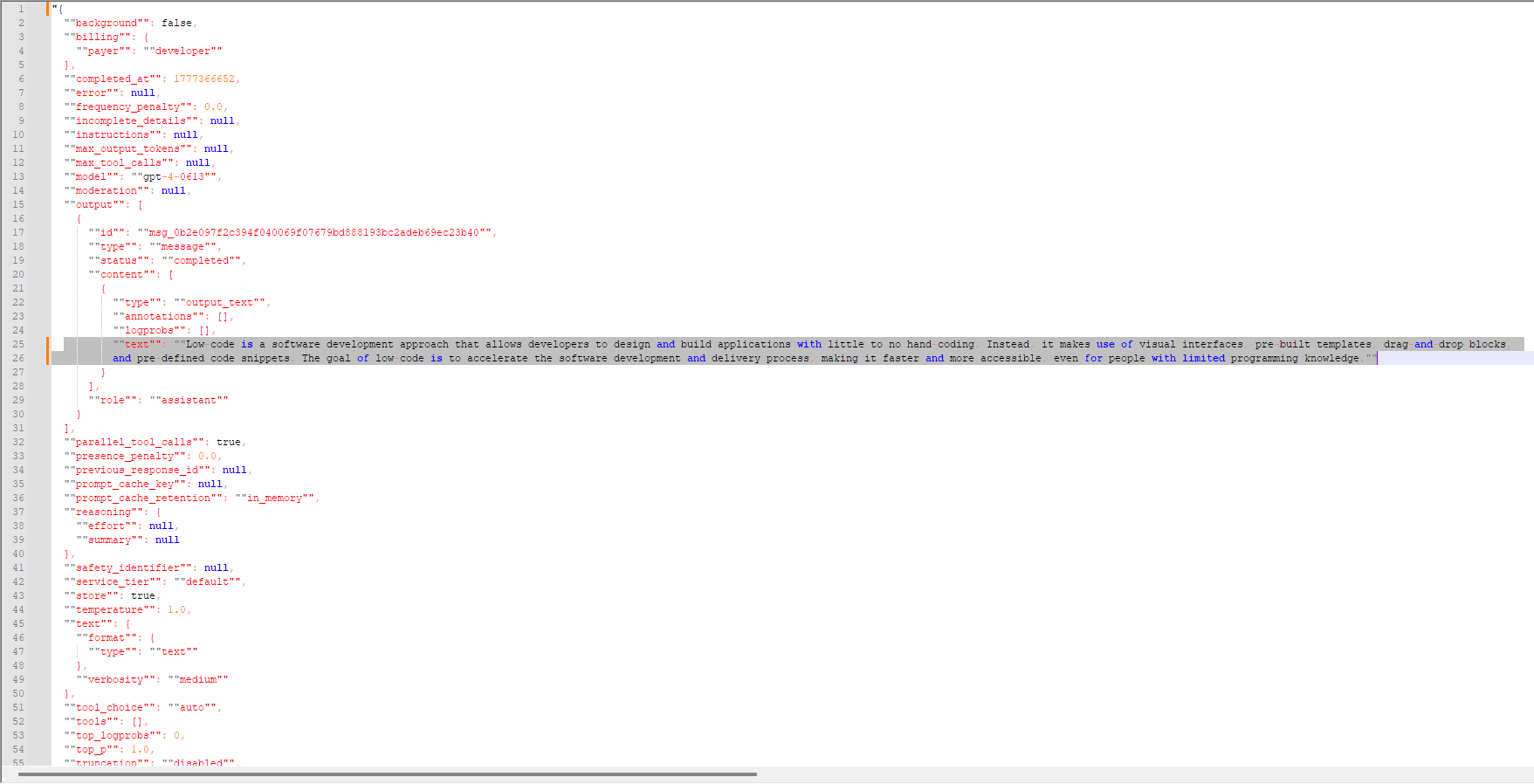 JSON response from the server
In this example, the LLM response is:
"Low code is a software development approach that allows developers to design and build applications with little to no hand-coding. Instead, it makes use of visual interfaces, pre-built templates, drag-and-drop blocks, and pre-defined code snippets. The goal of low code is to accelerate the software development and delivery process, making it faster and more accessible, even for people with limited programming knowledge."
The rest of the JSON text contains technical details: request descriptions, conditions, errors, etc.
Step-by-step interaction
- Open the Workflow file
chatgpt_api.mgp. - Prepare a JSON request with the required structure, as outlined in the documentation.
- Submit the request to the Table input port.
- Specify the necessary parameters in the input port for variables.
- Run the ChatGPT API submodel.
- Open the output port and verify the response.
Try Megaladata
Using the ChatGPT API connector, Megaladata lets you integrate a large external language model directly into workflows. This enables automatic text processing, intelligent search, description generation, data classification, and meaning extraction all within a single platform.
The solution is not limited to one model. Megaladata workflows can also adapt to work with other LLMs, offering flexibility to select and combine models based on specific business needs.
To evaluate the platform’s functionality, download the free community version of Megaladata here. You can also request a trial server version for your organization by filling out this form.
Integrating LLMs into Megaladata is a practical way to harness the power of modern language models in business analytics.
More on AI in Megaladata:
See also

How to Build a Data Workflow That AI Can Actually Trust

How To Use Execution Order Ports When Running Megaladata Workflows
Megaladata automatically optimizes workflow execution: It runs only the nodes linked by a data chain and uses parallel computing. However, in some cases, you may need to set the execution order manually. You...

1 TB in Under 13 Minutes: Performance Test Report
For this test, we ran Megaladata 7.3.3, importing 1 TB from two production DBMSs simultaneously, with transformations applied, over a standard cloud network. Five consecutive runs. Average: 12 minutes...
About Megaladata
Megaladata is a low code platform for advanced analytics
A solution for a wide range of business problems that require processing large volumes of data, implementing complex logic, and applying machine learning methods.
GET STARTED!
It's free