
A large telecom operator unified dozens of disparate data sources into a single system on Megaladata. Information processing time dropped from several days to hours: a 3-5 times speedup. More than 300...
How To Use Execution Order Ports When Running Megaladata Workflows

Megaladata automatically optimizes workflow execution: It runs only the nodes linked by a data chain and uses parallel computing. However, in some cases, you may need to set the execution order manually. You can do this using "Execution order" ports.
Workflows in Megaladata are visual: Data passes through a chain of nodes, where each node performs its operation and passes the result further. This makes working with workflows convenient for both developers and field experts without programming skills.
A simple interface enwraps many optimization and acceleration principles that provide high-speed data processing. This article covers some of them and highlights the related specifics of building workflows.
Why Megaladata does not always run the entire workflow
To keep workflows efficient, the system uses lazy evaluation. If a task does not need some of the available calculations, the system does not run them.
Megaladata offers three ways of running a data workflow:
- Run all. Use this button on the workflow area toolbar to run all workflow nodes. (The system might still not run some nodes inside supernodes; see item 3).
- Activating a specific node. Megaladata traces the data chain required to run the node, executing only the operations this chain includes.
- Launching a supernode. In this case, the system traces and runs the data chain required for the supernode output port (or ports).

When determining the required calculations, Megaladata tracks the data chain from the target node to the data sources (conceptually, right to left). Then, it runs the required node chain from left to right. The following example shows how this works for a specific workflow.
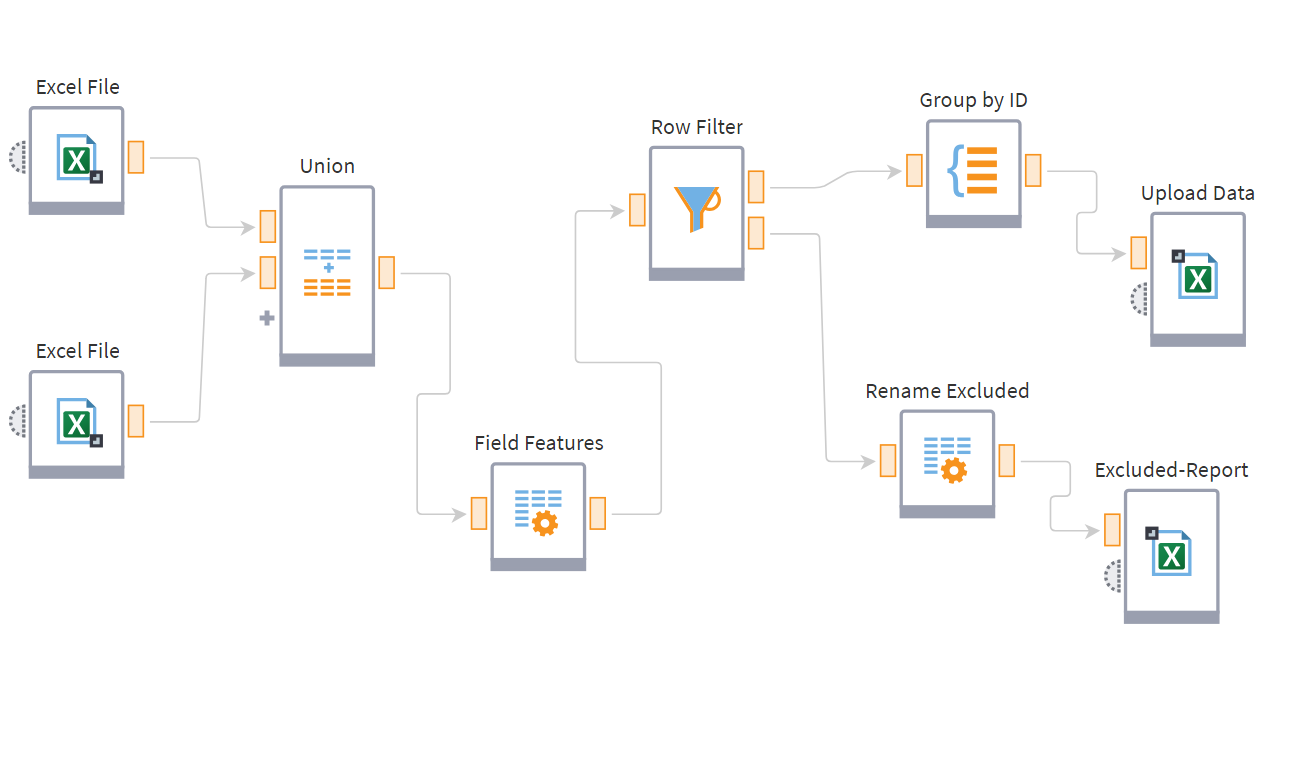
The workflow loads two files, joins them, filters the data, and exports two Excel files, one of which is an exceptions report.
The export node ("Upload Data") receives a run request. Before starting calculations, Megaladata "walks the chain backward" from that node and selects the nodes that must run to complete the task. Then the system runs only what the target node needs.
Executing the "Upload Data" node does not require running "Excluded-Report" and the node before it. Accordingly, when you run "Upload Data", the system does not activate the workflow branch that leads to exporting the report:
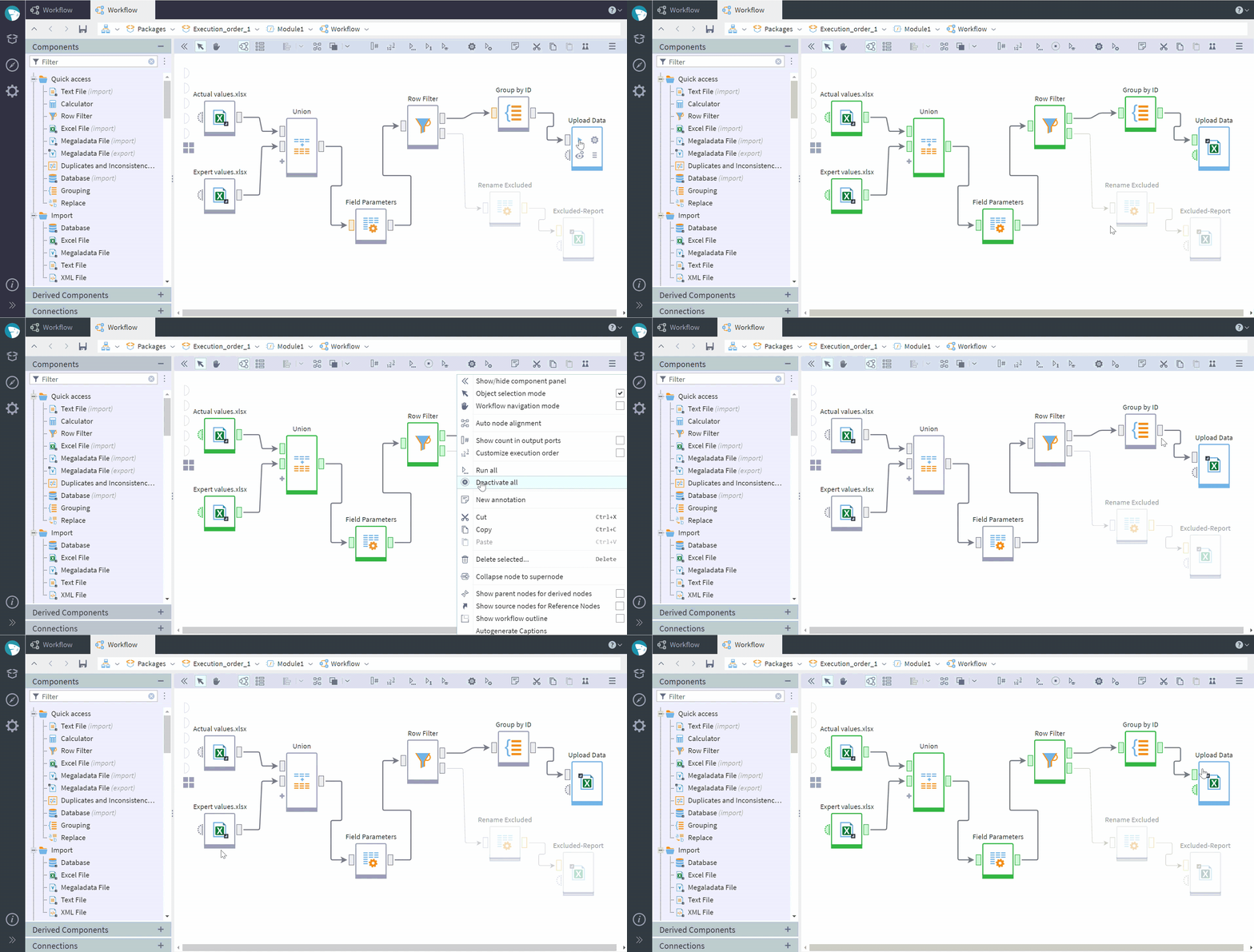
This approach significantly saves computer resources, reduces workflow runtime, and uses computing capacity more efficiently.
Parallel execution
Parallel computing is another performance boost method used in Megaladata.
If a workflow contains independent data processing nodes, Megaladata runs them simultaneously when possible, using available CPU cores and other system resources.
In most cases, this noticeably reduces runtime and delivers results faster with no need for extra configuration.
Important considerations
High performance might have its trade-offs. Lazy evaluation and parallel execution make workflows faster, but they can also cause unexpected system behavior. Possible issues:
- Some workflow branches do not run
- Nodes inside supernodes do not run
- Operation sequence errors occur
Consider an example. You may add reports as branches to verify that the workflow works correctly, without passing this data anywhere inside the workflow. This makes these branches remain inactive when other nodes are running (as in the screencast above).
More often than not, this happens within a supernode. When you see the supernode as executed, and it may look as if all nodes inside it have run. However, Megaladata follows the same optimization logic within supernodes: It does not start calculations if they do not produce the data required for the final results.
Important: This is not a platform error. On the contrary, this behavior is exactly why Megaladata runs faster and uses fewer resources. However, in some workflows you may want to explicitly specify which actions must always run.
When to set the execution order manually
Some tasks require you to control the execution order. For example:
- Sending a REST Service request and then processing the response
- Exporting data to a database, then reading from it
- Creating files that the next step must use
- Sending notifications after data processing completes
You expect these operations to run sequentially. But the platform analyzes data links inside the workflow: if there are none, it may run the operations in parallel.
As a result, a read operation may start before a write completes, or a request may start before the required data is available. To avoid such situations, set the execution order explicitly.
Execution order port
Megaladata provides the execution order port option for controlling the node execution sequence.
Connecting the Execution order ports of specific nodes allows you to configure which nodes must start strictly after other nodes complete, even if there is no data flow between them.
The Execution order ports are hidden by default. To display them, click Customize execution order on the workflow area toolbar.

For example, to run a workflow branch, link it through the Execution order port to a node that will definitely run.
Note: Setting the execution order is especially important if you run the workflow in automatic mode (through the Job Scheduler or BatchLauncher).
Execution order port: use cases
Lazy evaluation and parallel execution are important mechanisms that drive Megaladata's pioneering performance. They make workflows run faster and use fewer resources, optimizing the execution sequence automatically. Whenever the exact sequence of certain actions is critical, use the Execution order ports.
Supernode with no visible output ports
There are cases when a workflow contains a supernode with no output ports. Consider the situation shown in the screencast:
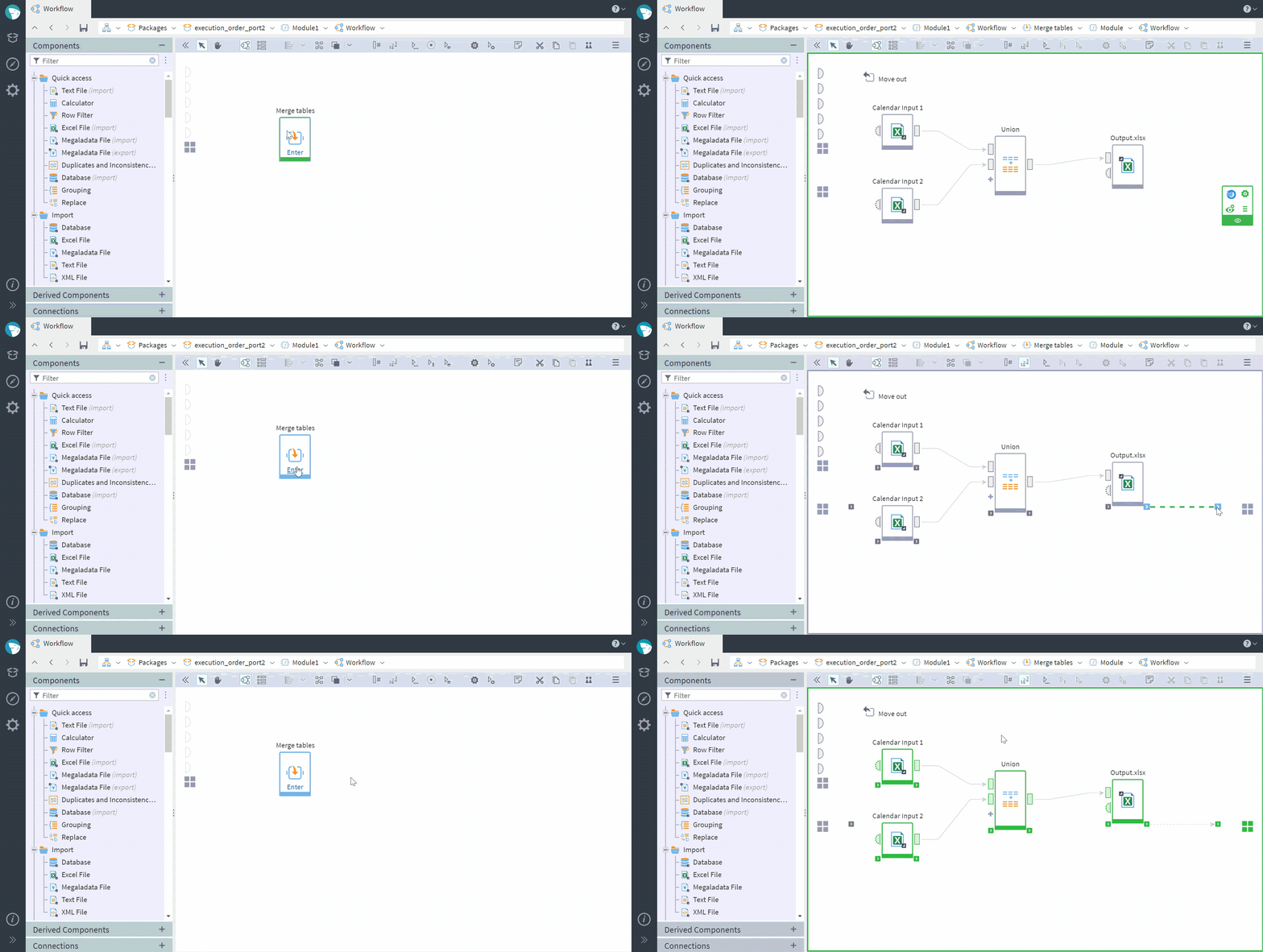
In this example, a supernode imports data from two Excel files, joins it, and exports to a new Excel file. Without extra configuration, the nodes inside the supernode do not run when you start the supernode: There is no data chain to the outside.
To launch the calculations inside with the start of the supernode, connect the Execution order port of the node that must run to the supernode's Execution order output port: It will appear on the right side of the workflow area when you click Customize execution order.
Multiple branches within a supernode
Another common case is several branches inside a supernode, where only one branch is linked to an output port. When you start the supernode, only the nodes that participate in producing the required result run. The other branch remains unexecuted.
To make that branch run as well, connect the Execution order port of the last node of the branch to the Execution order port of the node linked to the supernode's output port.
Parallel write to database
An attempt to write to a database in parallel can cause an error. To avoid it, connect the Execution order ports of the nodes that write to the database successively. This will make the nodes run sequentially rather than in parallel, and the errors will not occur.
Connecting to external services
Connecting to external services often requires time constraints. For example, manual execution order configuration allows you to add a timeout before an API connection to avoid blocking or errors due to exceeding the number of requests per time unit. Connect the "timeout" node (for example, a JavaScript node) "in between" the data node and the web service node through Execution order ports.
Bottom line
The Execution order port option implemented in Megaladata allows you to keep the benefits of lazy evaluation and parallel processing while ensuring predictable execution of critical operations. Use it in workflows that require an exact sequence of actions or the start of individual data processing branches.
Further reading:
See also

Megaladata as an Automation Tool: Case Study
How an E-commerce Retailer Reformed Replenishment in Three Months: Case Study
Replenishment planning for a large retailer means constant change: new seasons, new vendors, new regions. Every update used to mean a ticket and a wait. Here is what happened when they added Megaladata....

Semantic Layer
Large volumes of complex information force analysts to focus more on data management tasks than on data analysis. A specialized mechanism named "semantic layer" solves this problem. It provides a business...
About Megaladata
Megaladata is a low code platform for advanced analytics
A solution for a wide range of business problems that require processing large volumes of data, implementing complex logic, and applying machine learning methods.
GET STARTED!
It's free